Ability to split contribution between multiple activities and credit parishes
Users at both the Parish and the Diocese are able to Split Contributions from a single Fund to multiple Activities. Diocese level users are able to split on Credit Parishes as well
Ability to split pledge to activities and credit entities by amount (or %)
Tie a contribution to a specific pledge
Users are able to link a contribution to a specific pledge.
Tying old contributions to pledges.
We automatically associated all previous contributions with their respective pledges but in some cases we were unable to determine which pledge a contribution was associated with if there were multiple pledges to the same fund with overlapping date ranges. In this case we built a way for you to manually fix anything we may not have been able to fix automatically. Under Administration -> Procedures there is a new function titled “Contribution Pledge Matching” which can be used to clean up anything that may have been missed.
New pledge report: Contributions - Pledge Fulfillments Summary
This new report will give you a breakdown summary of all of your pledge related information for households as well as community members. This report will work slightly differently than the others as it will show you one line per pledge per split. This means that if you have a pledge that has been split between multiple activities it will show each split and the total paid towards that split. This report will also show any soft credits and how they relate to the pledge.
When searching for Household, Member, Community Member the search result will display the best matches at the top of the list. For example, search for "Smith" will display names with Smith first, streets with Smith next, etc.
In Reports with dates, option of "Between" is added
When creating a report with date and numbers, the option of "Between" is now available to avoid having to create two separate reports.
Added a "Sacrament Verified" button on all Sacraments
Parishes can check a "Sacrament Verified" box if documents have been received for the Sacrament.
Reports that can be connected to Evangelus
The Evangelus icon has been added to the reports that can be connected to Evangelus to help distinguish them.
Adding new household button
When adding a new household and the name matches other households in the system, a button has been added to select it as a new household not associated with the matching names.
Titles added to Fields in Query tab
When running a report, labels have been added to the query tab to replace + and (+)
Ability to revise an online batch after it is posted
We've introduced a new feature that allows users to edit a posted online contribution batch. After a batch has been posted, users with the appropriate permissions can make edits and modifications to it. However, if a contribution is older than a specified time period, the system will prompt the user to provide a reason for the change before allowing the modification. To track these changes, you can click the 'View Change' button, which will display a history of all the modifications made to the batch since it was originally posted.
A checkbox has been added to track if a parent has attended a Baptism class. Once the box is checked, a date field is available to enter the date of the class attended.
Update Titles to be Gender Specific
The Gender field on a Household Member will determine the list of Titles available.
Added the capablility to add a Tribute Type to a pledge
When a pledge is entered there is now the ability to enter the Tributee information.
Added the ability to Email out of Formation Reports
When using the Formation-type report, the ability to email is now available.
To avoid confusion between the Diocese Household ID and the Parish Envelope Number, both are now displayed next to each other on the main household screen. Batch Pledge Entry Enhancement
Batch pledges can now be entered by Envelope Number in addition to Household Name and Household ID. Added the Fund Activity Reference Number to the CSV Export for Batch Contributions
Added the Capability to Delete a Marriage Sacrament
A user can now delete a saved marriage sacrament if their role has the chosen right.Added the Capability to Track the Sacrament of "Anointing of the Sick"
This sacrament is unique in that a person can receive it more than once. Camino tracks the history and allows reporting on the most recent time it was received. Added the Capability to Display more Households, Members, and Reports Per Page
Previously, a user was limited to displaying 10 or 20 items (Households, Members, or Reports) per page. Now they can also choose to display 50 items per page. Additionally, the item "Parish Parameters" was added to the Administration menu to allow the user to set the default items per page for all screens.Enhanced Online Giving Contribution Matching
When importing online giving contributions, the name search will check not only the Household Last Name for a match, but it will now also check the Head Last Name, Head Maiden Name, Co-Head Last Name, and the Co-Head Maiden Name.
Added the Capability for a Parish Household to not Receive Diocese Correspondence
For dioceses that use Camino, they can enable individual parish households to opt out of receiving diocese mail and/or diocese emails. External Diocese IDs can be imported from a CSV file
On the Administration - Procedures menu, a new item was added at both the Diocese and Parish Levels. It's called "Import External Diocese IDs" and it allows the Camino administrator to import External Diocese IDs from a CSV file as long as certain criteria are met. A Parish Employee can be identified on the Member screen
A checkbox was added to the member screen that will allow the user to identify the household member as a Parish Employee.Funds can now be Categorized by Type
On the Administration - Parish Funds menu, the field "Fund Type" was added. This enables the parish to use whatever name they want for the fund description but to classify funds by specific categories.
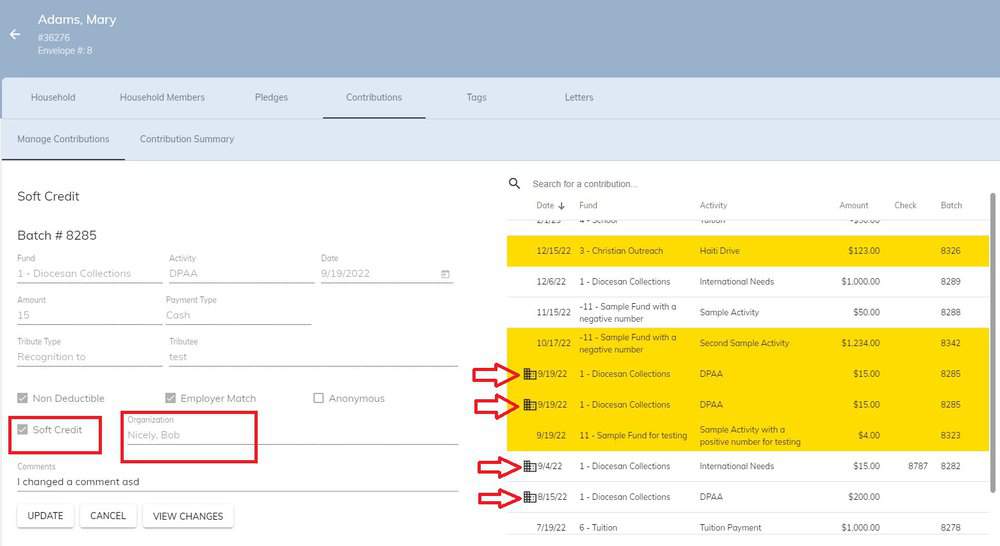
Soft credits (contributions made by an organization or business on behalf of a household) are now listed on the parishioner's contribution screen with a special symbol. When the soft credit donation is clicked, the name of the organization is displayed.
For Dioceses, Added features to the Credit Parish field
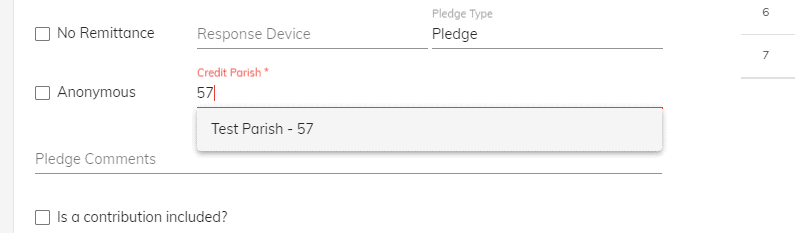
Added the capability to enter the Entity Number in the Credit Parish field for Pledges and Contributions. This can help increase speed and accuracy when entering a large number of pledges or contributions for a diocesan campaign or appeal.
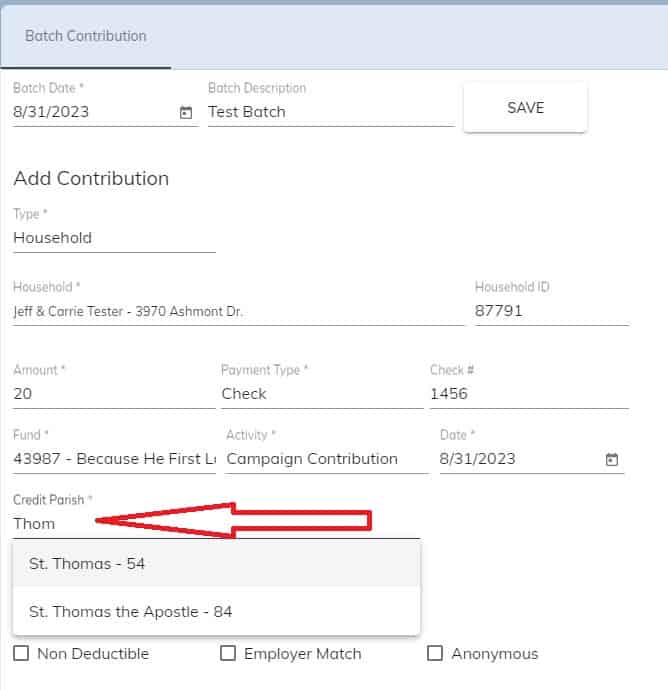
Added the capability to do a full-text search when entering the Credit Parish during Batch Contribution entry.
Sped up the time it takes to save a change to a household or member record
For Dioceses and Parishes, Added fields to different Report Types
For the Report Type of "Contributions - Monthly Parish Summary (Non-Recurring)", the following fields were added.
DETAILS > Donor Mailing Address Line 1
DETAILS > Donor Mailing Address Line 2
DETAILS > Donor Mailing City
DETAILS > Donor Mailing State
DETAILS > Donor Mailing Zip
DETAILS > Donor Mailing City State Zip
DETAILS > Credit Parish Formal
For the Report Type of "Contributions - Campaign Summary (Non-Recurring)", the following field was added.
Mailing Address City State Zip
For the Report Type of "Contributions by Household", the following field was added.
DETAILS > Credit Entity City
For the Report Type of "Contributions - All Donors", the following field was added.
DETAILS > Credit Entity City
For the Report Type of "Members", the following fields were added.
Household Formal Mailing Name
Household Formal Salutation
For the Report Type of "Member Assignments", the following fields were added.
Household Formal Mailing Name
Household Formal Salutation
Mailing Address City State Zip
Prim Assign City State Zip
For the Report Type of "Audit Household Changes", the following field was added.
Household First Names
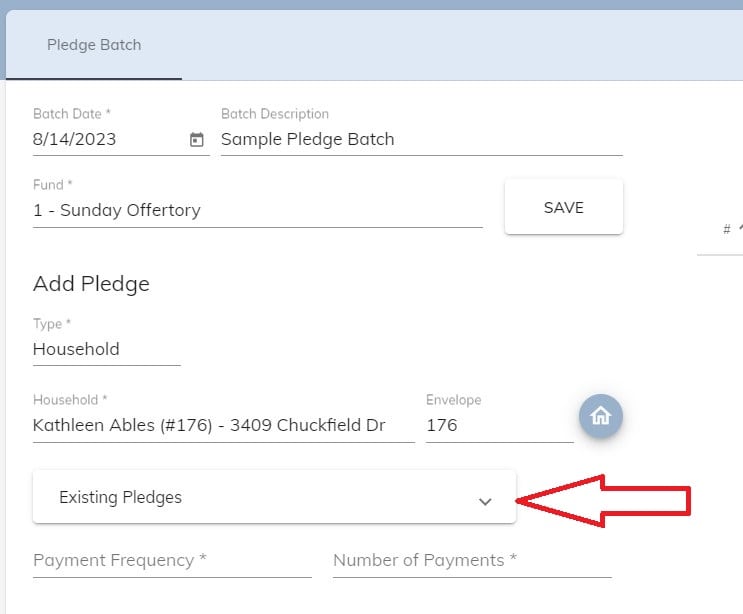
During Pledge Batch Entry, show any existing pledges the household has made to the same fund
This is done to help prevent the accidental entry of duplicate pledges.
Added fields to Formation Report Types
Added the following fields to the Report Type "Formation - Attendance"
Student Cell Phone Number
Home Email Address
Added the following fields to the Report Type "Formation - Class Roster"
DETAILS > Student Cell Phone Number
DETAILS > Home Email Address
Added the following fields to the Report Type "Formation - Student Classes"
Student Cell Phone Number
Home Email Address
Added the capability to search for a blank sacrament date
It is helpful to search for members who don't have a particular sacrament (e.g. they haven't been baptized). Previously it was not possible to search for a blank sacramental date. Now it is possible for any of the sacraments. It is also now possible to search for a blank celebrant.
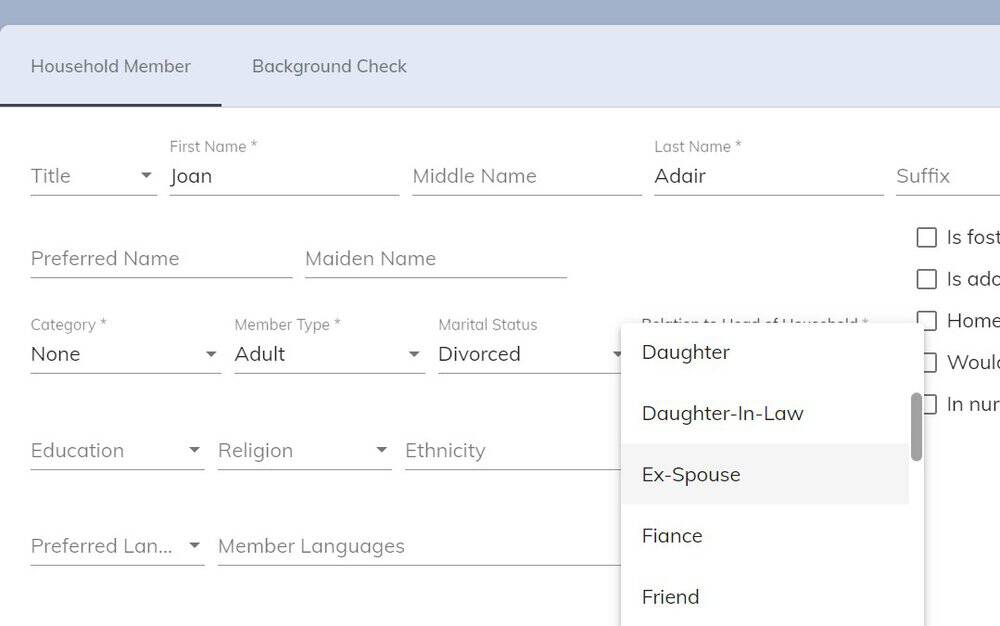
Add the Member Relation of "Ex-Spouse"
We've had requests to add "Ex-Spouse" as a relationship for a household member when the Member Type is set to "Adult". This is now possible.
Added the capability to print coupon books for pledges
A new Report Type of "Contributions - Pledge Payment Books" was created. This allows you to create payment books with Payment Date and Payment Number for contributions that are due in the future.
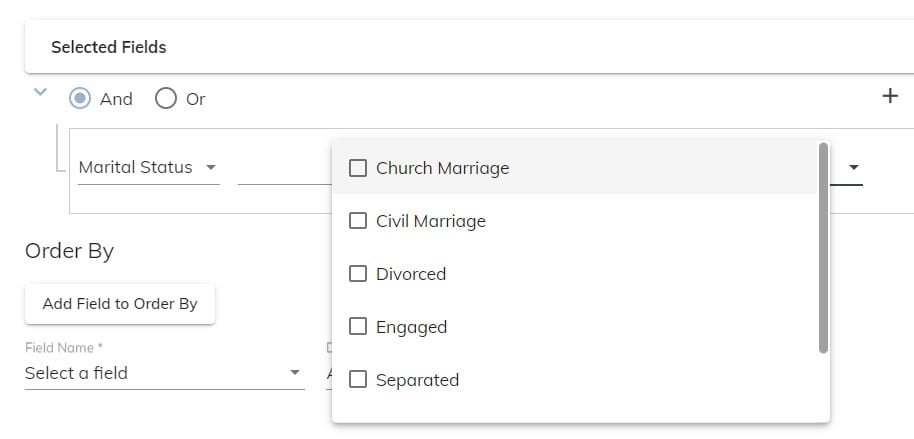
Changed report criteria to be smarter
When entering selection criteria for reports, most fields that have a fixed number of choices now will show those choices as check boxes or as a list. (e.g. The field "Marital Status" can only have 1 of 7 options. Now the relation of "in" can be used and all 7 choices show as checkboxes.)
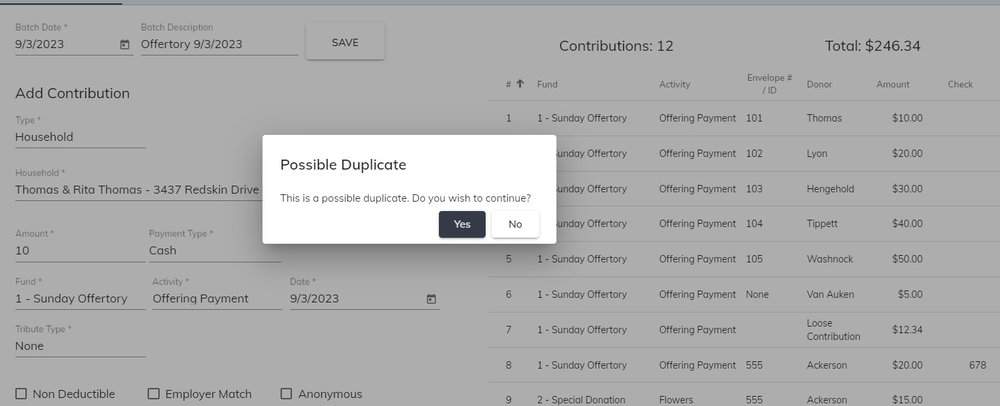
Warning message when possible duplicate contributions are entered
When entering a batch contribution, if another contribution exists for the same household with the same envelope number, amount, date, fund, and fund activity, the message "This is a possible duplicate. Do you wish to continue?" displays. You can click "Yes" or "No" and continue.
Added "Pledge Type" and "Response Type" fields. This will further identify information about the pledge.
Added a "No Remittance" checkbox next to the "Anonymous" checkbox to be able to identify donors that do not want to receive a remittance for the balance of their pledge.
Added a house icon at the end of the Household field. Clicking this button takes the user to the Households screen so address and other contact information can be updated. Clicking the "Batch Pledges" menu item when done brings the user back into the current pledge batch.
When a Down Payment is entered during the Batch Pledges process, the "Is a contribution included" checkbox is automatically checked and the amount of the Down Payment is automatically copied to the Contribution Amount field.
Other Enhancements:
Added the ability to change the Head of Household from the main member listing screen without having to open the member record.
Added the ability to add personalized links to the online formation registration form by a user.
Added the ability to search by Maiden Name on the household and member screens.
The 7-digit phone number (cell or home without area code) is now able to be searched as well.
Previously there were some issues with searching for people with special characters in their names (e.g. O'Connor). That has been resolved.
Added the capability to store background check information at the parish level. Previously, this was only available at the diocese level.
Students can now be added to a Formation class from the Formation tab on the Members screen.
A Reference Number field has been added next to the Fund Activity name on the Fund Detail screen.
When a household contribution is changed in a previous year, the field "Reason for changing an old contribution" appears and is required to be filled in. That field now appears when changing current year contributions, but it is optional to be filled in.
When enrolling a student in a formation class, the list of names that is displayed now shows the person's birthdate as well as their Member ID to help differentiate students with the exact same name.
When entering batch sacraments, the Baptism date is now displayed as a reference.
Diocese and Parish additional features and corrections:
The information in Address Line 2 is now included when doing Household searches.
Household, member, and contribution searches have been sped up significantly at both the Diocese and Parish levels.
When searching for a Credit Parish at the Diocese Level, a full text search is now enabled. Previously, it was only starting the search with the first name of the parish.
When entering a sacrament place for an individual and choosing "Find a Parish in Discover Mass", the heading "Please choose where this sacrament took place" will now continue to be displayed to avoid any confusion.
For formation programs with many pages of classes, it was annoying if you were working on a class on page 15 and then were taken back to page 1 when you left the class. Now, when done with a class, you are returned to the same page that you left.
The length of the Comments field when importing online giving was increased to be able to handle multiple tributees.
On Diocese and Parish Batch Contributions, if the Payment Type is Check, hitting the ENTER key will take the user directly from Amount to Check # when Check Number is enabled. This will allow the user to only use the 10-key pad for entering batch contributions by envelope number.
Additional fields were added to the Diocese's Recurring and Non-Recurring Pledge Reports to better handle soft credits.
Additional links to webpages can now be added to the Formation Online Registration Confirmation Screen. These links can be used to have the parishioner fill out a photo consent or a medical release or another document needed by the parish's faith formation department. Currently, the parish will need to contact Diocesan to have this done.
Profession of Faith can now be entered when Baptism Date is unknown
Clicking the Ordination events on the Sacrament Summary tab now takes you to the Ordination tab.
The Virtual column now appears in the course description on the public-facing Catechesis page.
The Member History tab now shows proper heads of household in both directions for members moving to new households.
Users with only View Household Members rights can now see Members without an error requiring Sacrament rights.
Student Names and Class Dates are now frozen on Formation Attendance Screen for better usability. You can now scroll left to right or up and down without losing headers.unnamed.png24.74 KB
For Dioceses, Catechesis Registration now freezes names and dates for attendance like formation unnamed.png28.45 KB
The Sacraments tab is now clickable. If you click one of the Summary Sacraments, it will take you to the proper tab. unnamed.png14.74 KB
Date of Birth added to Formation Roster page to help to identify the proper member unnamed.png12.61 KB
Updates to Notifications
Notifications now show in large panels.
Notifications no longer are created when a Family is added to a parish. Instead, notifications are triggered any time a household is added as a Parish Household, School Household, or Formation Household at another parish.
If Parish Household is checked at Parish A, and Household is a member of Parish B, Parish B is notified.
No notifications are sent if the household is just added as a donor (Household, School, and Formation are not checked)
The message was modified to show what kind of registration occurred (Parish, School, Formation, or a combination)
Household ID and Household First Names were added to the notification message for clarity. unnamed.png7.48 KB
Virtual Option added for Catechesis classes at Diocese level. Both fields are also available in the reports as well.unnamed.png14.53 KB
Diocese and Parish additional features and corrections:
Vision 2 is now supported for online giving. Vision 2 can be configured similarly to Vanco Autoconnect.
Query Name label Changed to Report Name
Confirmation Name is no longer required for batch Sacrament Posting
Date of Birth added to the Formation Online Registration processing (similar to that added to the Formation Roster page.)
Funds Page overlaps fields at certain resolutions. This was corrected.
When no DOB is found, hyphen is removed from Formation Search list. This was corrected.
The Hamburger menu button was not working. It has been corrected and now shows other Diocesan products.
A date error was showing on the Assignments page if the assignment ended today. That has been corrected.
Several fields were added to the Report Type, "Formation - Class Roster"
Head Religion
Co Head Religion
Head Occupation
Co Head Occupation
Head Employer
Co Head Employer
Additional audit fields were added for tracking user changes to households
Phone Number
Email Address
Additional audit fields were added for tracking user changes to members
Cell phone
Email Address
Work Phone
Work Email
Occupation
Employer
When clicking "Save and Copy to Spouse" on the Marriage sacrament tab, the husband's middle name was not copied. This has been corrected.
Several fields were added to the Report Type, "Formation - Student Classes"
First Communion Place
Confirmation Place
Marriage Place
Marriage Date
The country "Northern Mariana Islands" was added to the sacrament country dropdown list.
Notification option moved to the bottom of the main menu.
New Report for Sacrament Only Members
Any Documents added to the report above will also now show on the new Letters Tab of the Sacramental Only Non Member page
For Dioceses that may need it, we added a new field to store the External Diocese. It has also been added to all household reports. We also added two new diocese parameters
SHOW_EXTERNAL_DATABASE_ID if true will show the External Database ID field at Diocese and Parish Level for Households.
PARISH_EDIT_EXTERNAL_DATABASE_ID if true will allow the parish to edit this value
Added Finance ID for Diocese Community Members.
Changed label of Custom Mailing Name to Formal Mailing Name
An advanced searching tool tip has been added to the Household page
The Last Name search.
This search is a "Begins with" search, so to search for last name you will enter "l= or L=" then the last name into the search bar (To search for Smith, L=Smith or L=Smi or L=Smit)
The Envelope and ID search
These searches are exact key searches. Once keyed in, the search typically takes a few seconds to appear
To see the tool tip for advanced searching on the Household page, hover over the info icon
Household Member History
When under the Household Member Listing tab of a Household, if a member has been added or removed from the household a button will appear in the top right of the page "View Former Member History"
Made-up and Excused have added as options when taking Attendance in a Formation class
Multiple Dispensation types can now be chosen under the marriage sacrament. In addition to being able to choose multiple dispensations, a free text field has been added for any additional dispensation types
Access level can now be changed after a report is created and saved. Either the report creator can change the access level or users with the right "Reports Administrator" can change access levels for any report
Multiple roles can now be given access to reports when choosing the Access Level of "Role"
Previously, when entering batch contributions, the household could not be changed after entering a contribution. The Household can now be changed before or after posting the batch
When running the Grade Promotion Procedure, if a grade promotion was run in the last 9 months, a message will appear saying that a grade promotion was run recently
When entering a pledge batch and a contribution is included, the Payment Type, Activity, and Contribution Date will be remembered after entering the first contribution
The formation attendance page has been updated to be mobile friendly
Catechists can now easily take attendance directly from any smart device, tablet, or computer
Tags can now be added and removed in batches
The new feature is found by navigating to ADMINSTRATION > PROCEDURES > BATCH TAGS
If you don't see batch tags under PROCEDURES, you will need to have the right of batch tags added to your role
Once the Tag Type and Tag are chosen, the left side is where you will remove the tags, and the right side is where you will add tags
In Batch Pledges, when entering a contribution along with a pledge, the Activity, Payment Type, and Date will be remembered for the next contribution being added. The same way that Batch Contributions remembers those fields.