Newest updates
New
Improved
April 2022
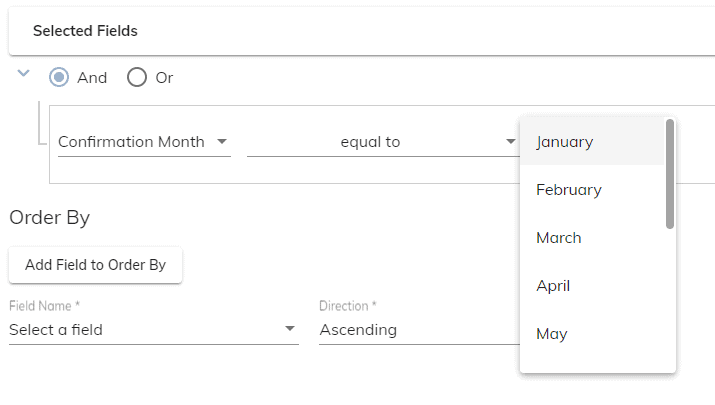
- New dropdown lists have been added to the criteria section of reports. This will allow for easier and more accurate reporting. Examples:
- Member Type
- Baptism Month
- More Camino video tutorials are being created. If you have a suggestion of a video that you think should be created, please let us know!
New
Improved
Fixed
March 2022
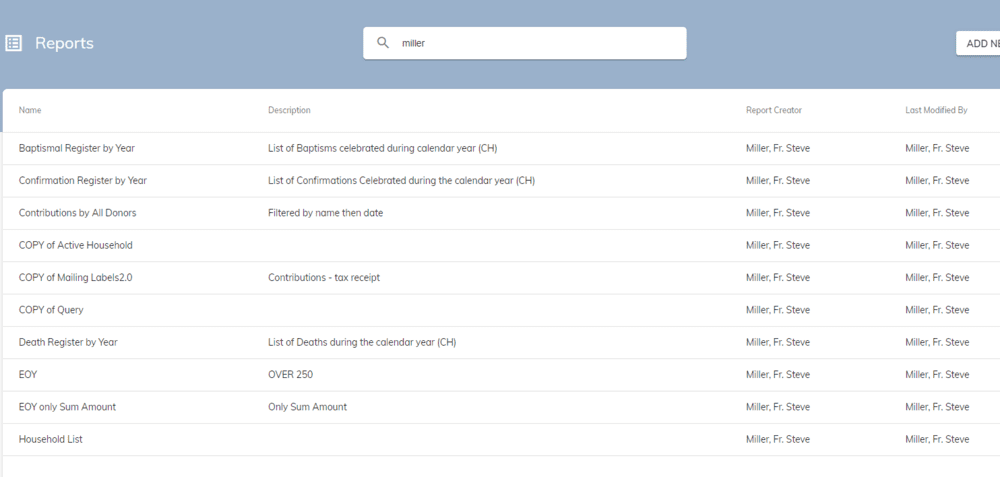
- The reports listing now shows who created and who last modified a report. This will allow for a search to be conducted for reports created or modified by a specific user
- The option to include comments in the PDF versions of the Batch Contribution reports is now available
- The Batch Contribution screen now has a search bar. Searches can be conducted by batch number, description, or date (m/d/yyyy)
- The default activity under a fund will now appear first in the activity list when entering contributions
- Two new report types are now available:
- Contributions - Monthly Fund Totals
- Contributions - Monthly Fund/Activity Totals
New
Improved
February 2022
- Some video walk-throughs are now available with more to come in the future. Here is the link to the videos: https://video.diocesan.com/page/camino-tutorials
- The Diocesan side menu is now accessible from Camino. This will allow you to navigate between all Diocesan products with ease
- The three bars or the "hamburger button" is how you will access the Diocesan side menu
- To hide the side menu in Camino, click the arrow to the left of the Camino logo
- Check number can now be made optional when entering contributions. Please contact Diocesan and submit a support ticket in order to enable this feature
- Three custom fields can now be added to the Formation Online Registration form. You can add 1, none, or all of the fields to the form
New
Improved
Fixed
January 2022
- A major change has been made in how sacrament places are entered. We have integrated with Discover Mass which will allow for a quick search of any parish in the United States to be added as a sacrament place. For your convenience, a video overview of the new feature is at the bottom of this message.
- A phone number mask has been added. This will automatically format a phone number as you type it in. The mask has also been added to the Formation Online Registration form.
- 3 new sections have been added under Administration>Lists
- Common Cities – This list will create a dropdown to choose from when entering addresses (City name only, do not include State) ex. Chicago.
- Common Places of Birth – This list will create a dropdown to choose from on the Baptism screen (City and State for this list) ex. Chicago, IL.
- Non-Member Clergy – This list will create a dropdown for the celebrant field for any sacrament (Intended for clergy that do not belong to the parish or the diocese).
- Camino now remembers the last envelope number assigned by your parish. This means when entering a new envelope number the first option in the dropdown list will be the next available number after the last number assigned. For example, if the last envelope number assigned was 301, the dropdown list would be 302, 1, 2, 3.
- When searching for a household, you can now search for the preferred name of the Co-Head and Head of Household.
- When adding a new member to a household the last name of the household will auto-fill into the member’s last name. This can be changed if need be.
- When adding a new household, Camino will now find partial matches in the first name field if the last name is an exact match.
- Do not forget about the Camino Knowledge Base. The Knowledge Base contains articles that can help answer questions you may have about Camino https://diocesan.com/knowledge-base/
New
Improved
Fixed
December 2021
- Vietnamese and Korean characters are now supported in name, place, address and notes fields.
- A sacrament summary page has been added. This page shows the sacrament name, date and place.
- Parent names have been added to the Confirmation Sacraments page.
- On the baptism or confirmation screen, when mother's name is chosen from the dropdown list, the mother’s maiden name will populate from the mother’s member screen.
- When entering father and mother on the baptism or confirmation page, the Head and Co-head of the household will appear first in the dropdown list.
- Next of Kin has been added to the Funeral Sacraments page.
- Occupation and Employer have been added to the member screen. These fields are free text fields and we still recommend using talents to keep track of common occupations.
- Work email address has been added to the member screen.
- The relation of Spouse was limited to the member type of Co-Head. Spouse is now also available for the member types of Adult and Other.
- A new right has been added that allows users to edit contributions over a year old. This right is not automatically assigned to any role, so if needed make sure to add this new right to roles where it is needed.
- Do not forget about the Camino Knowledge Base. The knowledge base contains articles that can help answer questions you may have about Camino https://diocesan.com/knowledge-base/
New
Improved
Fixed
October 2021
- A new right is now available to be assigned to roles. This right allows a role to view and input pledges toward Formation only funds.
- Improvements have been made to the criteria section of reports. Now when you select a field, for example, Fund Number, a dropdown list of your funds is now available to be chosen.
- For parishes who use pledges: A summary of the Total Paid and Balance remaining towards a pledge is now available under a Household. To find this new feature go into a household. Go to the pledges tab for the household. Click on the pledge you wish to view. You will see a recap on the right side of your screen.
- New fields have been added to the “Members” report type. Sacrament Place Names formal (ex. Baptism Place Formal) These fields are intended for Certificates and letters so that instead of St Mary, Boston it will say St Mary Catholic Parish.
- When attempting to add a Catechist to a class in Formation and that member is not in the dropdown list, an error appears. The error message has been changed to include what action must be taken to fix the error.
- Do not forget about the Camino Knowledge Base. The knowledge base contains articles that can help answer questions you may have about Camino https://diocesan.com/knowledge-base/
New
Improved
August 2021
- New Household and Member Audit Report types are now available. These report types allow administrators to see what changes have been made and by whom
- Formation Online Registration
- Mobile responsiveness has been improved
- Spanish translation is now available on the online registration form
- New fields have been added to the form including household information. These fields do not overwrite what is in Camino. The fields can be found when using the report type “Formation – Online Registrations”
- Preferred name is now used on the Formation Attendance sheet if the member record contains a preferred name
- A new field has been added to the household screen. The new field “Custom Mailing Name” allows you to customize the mailing name for a household. The field will automatically populate with the Formal Mailing Name. From there is can be changed if desired. The fields that pull the “Custom Mailing Name” in the reporting section are “Formal Mailing Name” and “Donor Name Formal”
- The Camino Knowledge Base has been completed. This contains articles that give little tips on how to do various things in Camino. The link is below https://diocesan.com/knowledge-base/
New
Improved
Fixed
June 2021
- We switched over to a new login which will allow for seamless transition to other Diocesan products in the future
- A new report type has been added called “Formation – Student Classes.” This report is intended for, but not limited to, the creation of Formation certificates as well as emailing from Camino to Formation households
- Under Import Online Giving – The download report button now gives you the option to choose the report with or without comments
- When you change the name of a report and save it, the name now updates in the blue area of the screen without having to refresh the screen
- Improvements to the Formation Online Registration form have been made, including making the form mobile friendly, with more improvements to come
- Fields overlapping on the household and member screens have been corrected
- When in the Reports section and then searching for a report on page 3, for example, no results would appear. This issue has been fixed
- A fund activity can now be marked to not count towards the total paid of a pledge
New
Improved
Fixed
April 2021
- Formation Online Registration is now available, contact support to get the link to the registration form
- When a member is marked deceased incorrectly, you can now "Resurrect" them. You will see the "Resurrect" button on the member screen of deceased members. NOTE: To have this ability, add the right of "Resurrect Members marked Deceased" to a role. The Member Type and Relation to Head of Household will be made "Other" and will need to be updated by the user to the appropriate fields
- Ability to post Sacraments as a Batch. Location: Administration > Procedures > Sacrament Batch Note: This is also a right that must be added. “Ability to bulk load Sacrament data for large groups” is the name of the right
- New ‘Listed’ fields for Addresses and Phone numbers have been added
- Examples include ‘Mailing Address 1 Listed’ or ‘Head Cell Phone Number Listed’
- These fields are intended for Directories or Guide Books
- The field pulls, for example, Head Cell Phones that do not have the checkbox ‘Cell Phone is unlisted’ checked on the member screen
- Formation Attendance Report Enhancement
- The “Download Attendance Report” button now allows you to choose a blank or filled out version of the report
- Zip code is no longer required for most countries when adding sacraments. The only two that will require a zip code are the United States and Canada
- Suffixes have been added to the Member Listing page
- An Emergency Contact Tab has been added to Formation
- The members on the Household Members screen are now ordered. The order goes Head, Co-Head, then by age. Deceased members will appear at the bottom