Within the User screen of Camino there are options to "Enable Two Factor Authentication (2FA)" as well as a location to input a cell phone number. If that checkbox is checked and a cell phone number is entered it will default to an SMS multifactor authentication. If the box is checked without a cell phone number input it will default to a email multifactor authentication.
Since email address is the username for Diocesan's Single Sign, email address is now a read only field within a user screen. If a user needs to sign in with a new email address they will need to have a new user account created and the old user deleted.
There is now an option to link the user with a Camino member profile.
On the household screen you will now see a new piece of information. If the household is listed as an Active Household at another Camino parish within your diocese you will be able to see that on their household screen. If the member is not active at any other parish this field will not appear. Example Below:
There is a new optional field under the Baptism Sacrament tab: Mothers Name for Certificate.
Baptism certificates typically call for the father's full name and the mother's full name including her maiden name. In many cases, however, only the last name is stored — making merge field certificates and printed documents awkward. This new field gives parishes a dedicated place to enter the mother's name exactly as they want it to appear on the certificate, alongside the existing father's name field. New Baptism Field
Anointing of the Sick Delete Button:
It is now easier to delete accidental Anointing of the Sick records. Previously, you had to select the specific instance and scroll to the bottom of the record to delete it. We've moved the delete button to the summary screen for each individual instance, making removal quicker when needed.
Formation Report: Portuguese Language Option Available
We've included Portuguese as an option on our online formation registration forms.Portuguese Option Emergency Contacts:
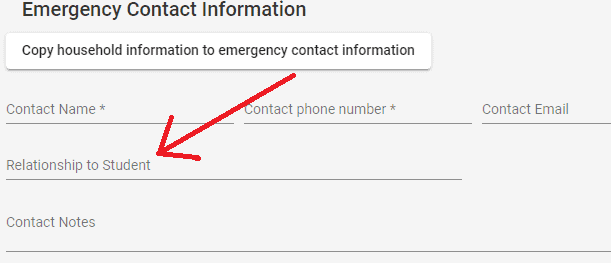
There are new rules in place in Camino regarding emergency contacts and new entries through Formation. When a member already has an emergency contact and a new contact is added through the formation registration, the newly added contact will become the primary contact. If the emergency contact entered through formation registration is already in Camino a new contact will not be created as to avoid duplicates.
When entering contributions or pledges and inputting household information the automatic sort order will now be:
Active
Inactive
Archived
Deceased
For example: all "Smith" families will not hold the same weight when showing up, but priority will be given to Active "Smith" Families.Household Sort Example Anonymous Pledges & Contributions:
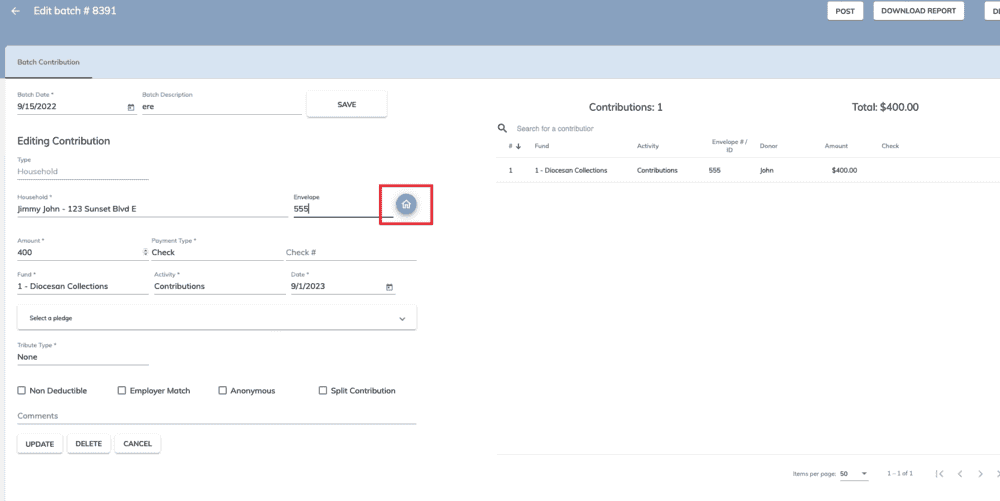
When entering a contribution which is associated to an anonymous pledge the contribution will automatically be set to "Anonymous." This field will be read only based on the pledge status as anonymous.
If the pledge is changed to anonymous or not anonymous, all linked contributions will be changed as well. Anonymous Pledge Example Sacrament Summary Screen Updates:
Previously this screen only showed "other important dates" that had specific given dates. It will now show the events if they are marked "Date Unknown." There was also a bug updated so that when a member is marked deceased with a date unknown the Member Type would also update as deceased. Deceased Date Unknown
Parish Level Updates:
Baptism Batch Sacrament:
We have added Baptism to the Batch Sacrament Procedure sections in Camino.
If you go through Administration > Procedures > Sacrament Batch you are now able to select Baptism
Baptism Batch SacramentOnce Selected you will be able to fill in the common data and add the sacramental recipients. You will bethe individual information to enter for each recipient as well.Batch Baptism Screen If you attempt to add a sacrament recipient who has already received, or has a record for the sacrament you will be given the following error message: Batch Sacrament Error Message Mass Time Sorting:
Under Administration > Parish > Mass Times Tab the mass times have now been sorted to be chronological beginning with Sunday Mass types. This will show the Saturday Vigil masses prior to the Sunday morning.Sorted Mass Times Formation Information:
When adding a member to a formation roster there is more information given prior to confirming their registration. Users can now see First Communion and Confirmation dates along with Baptism and First Reconciliation sacramental dates on the dashboard. Emergency contacts also now show up on the registration screen even if the course was not setup or required to collect emergency contacts. If the member has one on record they will appear. Member Roster Dashboard Parish Level Fund Total Dashboard:
Parishes now have a dashboard for their Non-Recurring Funds to show a breakdown of the fun in one location. This can be enabled at the Parish Fund Screen: Administration > Settings > Parish Funds > Any Fund
As long as the fund is not set to "recurring" a "Goal Dashboard Settings" will be available. You will be able to set the Fund Goal as well as the roles which will have access. With this selected there will now be a new visible dashboard that reports on the status of the Campaign.Adding a Goal Dashboard to a FundThe Goal Dashboard will contain the following information:
Amount Pledges
Number of Contributions
Largest Pledges
Largest Contribution
Total Commitments (Commitments is Pledges PLUS non-pledge gifts)
Total Collected
Goal
Active Parish Households
Percentage of Active Households with Commitments
Percentage of Active Households who have Contributed
It has the following three (3) charts:
A Percentage of the Total Goal, based on Commitments
A Percentage of the Total Goal, based on Collected Amounts
A Breakdown of the Donors
This is a drill down chart and will give specific information for each selection when that section of the pie chart is selected.
The Anonymous section are those entered as Loose Contributions and Regular Household or Community Contributions, where the Anonymous Checkbox was checked
Parish Level Fund Dashboard Finally there is also a "Donors Details" Tab which will give information on all donors to the specific fund. You are able to filter and sort by member type. Active/Inactive, Parish/Non-Parish Member, etc. This list can be exported direction to .csv with minimal columns for quick reference, or as a deluxe report with additional contact information.Donor Report
Ability to set Role access based on member categories:
Within the Chancellery module you can now set a role to have "Limited Member Access" based on a member category.Limited Member Access
Members with this role, when going to the household screen, will ONLY see Households that have at least 1 (one) member in their allowed category.
Members with this role, when going to the members screen will only see Members with the selected Categories.
Members with this role will also only have their selections available in the search bar to filter from. Search Filters
NOTE: This does not affect Contributions, Pledges, the Parish Level, Catechesis, etc.
NOTE: Reports are also not limited. This is for viewing rights within Household and Member screens only.
Future Assignments Address Options:
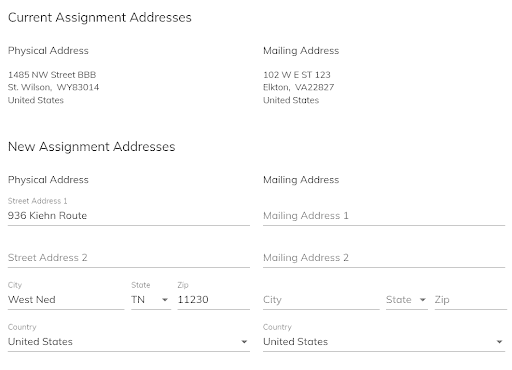
Future Assignments for Religious, Priests, and Bishops can now be set to automatically update Street and Mailing Address to the new Residence when the Assignment becomes active.
When creating a new assignment for a member, if Future Primary Assignment is selected, once the address type is selected an optional checkbox will appear. This checkbox states "Change Address with new Member Assignment." If checked the following new fields will show up for "New Assignment Addresses" to be filled out. New Assignment Addresses Batch Pledge input options:
When inputting pledges you can now search for households and community members by their IDs.Batch Pledge Options
When accessing the members module within Camino you have the ability to filter the members by "Only Formation" or "Only Sacraments". We have updated the view within the "Only Formation" view to give a more targeted view of your formation members. When accessing this filter you will not see information such as: Gender, Date of Birth, Grade, Formation Grade, Class, and their status.
Within the Sacrament Summary screen a new Verified column has been added so you can now see at a glance which sacraments have been marked as "Verified" for that individual member.
Camino now allows the ability to import a .csv file to auto-populate a fund's goal listing.
First we go to Administration > Settings > Diocese Funds and select the fund we are working with Diocese Funds Next we select the "Fund Goals" tab at the top of the screen and in the top right we will see an "IMPORT" button. Fund Goals Once selected we will be prompted on what type of file is to be imported. Import Fund Goals Screen Once your .csv file is set up correctly you are able to drag and drop into the import location and the goals will populate for your fund.
New Planned Giving Section: Estate Gifts at Parish and Diocese
Turning on Estate Gifts:
Camino is expanding it's planned giving section to include the ability to store and track estate gifts. The tab, previously labled as "Pledges" now reads "Planned Giving." Planned Giving Tab Currently when selecting this new tab "Pledges" is the default and only item which will show up. Pledges did not change, but was only moved one level lower. It will also be the default planned giving type when selecting this section. Pledges To turn on the new estate section of planned giving, the rights of users must be updated in Administration. Moving to Administration > Users and Roles > Roles. Select the role that you would like to add the rights to for the inputting, updating, and deleting of estates for. Once there, move those rights over to that role and click save.
Adding Estate Rights Once completed, you will need to refresh the page for it to take affect. Once done we can go back to our "Planned Giving tab and see the estates section listed as an option.
Once on this screen you can select "Add New Estate Gift" in the top right to bring you to the Estate Gift Entry screen. You will input the required information for the gift. Gift Category: Type of estate gift, selected from a pulldown Commitment Date: The date the gift was committed to the Parish or Diocese Commitment Amount: The value of the gift at the time of commitment. This is the ESTIMATED value of the gift at the time it was committed. Notes: Any notes specific to the gift.
Note: If you change any information after hitting Save, you will be required to enter a "Reason for Update" to save again. These changes will be tracked in a new tab labeled "Estate Changes"
Once saved two new sections will show up. An "Estate Documents" and "Estate Notes" Section where you will be able to upload files specific to the information on this Estate Gift. These documents and notes will be available to the person posting contributions at the time of fulfillment. Estate Screen This Estate gift will now show up under the Household's planned giving section with a "Pending" status. Pending Estate Realizing an Estate Gifts with contributions:
Within the household you are able to go to the Contributions tab and use the "Manage Contribution" section to realize an estate gift. Once there select the fund which the gift is directed towards, the date it is being realized, and the amount. If you are realizing the estate gift you will select the Estate Gift Checkbox and select the specific Estate gift you are doing. You also have the ability to split this gift between different activities.
Note: If the gift is split between funds, and not just activities, you are able to enter multiple contributions pulling from the same estate gift until the full value is realized.
Once that information is completely entered you will click "Add and New". The contribution will show in the Contribution Summary Section of the screen, which can be selected for more details.
Once the contribution is made we will see back on the planned giving screen that the estate gift now has a Realized Date and Realized Amount filled in with the status changed to "Fulfilled".
When moving a member from one household to another, existing or you, you will select the member you are wanting to move. Then in the top option bar there will be a MOVE option. Move Households There will be a screen allowing the selection to move the member to a New household or an Existing Household. Also there is a field to input the reason for the change.
Moving to a new household does not require any other sections or information. You will select "MOVE MEMBER" and they will be placed in their own, new household. You will be taken to her household member page where any new information can be added to her household. New Household When selecting to move a member to an existing household a table search will appear. This is where we will pick the household to move the member to. We will also select the relationship to that new household. The Head of Household will be grayed out since it will already exist for the household the person is moving too.
Changing Heads of Households: In each household there is an option to change the head of household at the top menu.
Change of Head of Household When this is selected you will be taken to a "Change Head of Household Screen." In this screen you will first select the new Head of Household. Once this is done pulldowns will be available for all the members of the family to be reassociated to the new Head of Household. The previous Head of Household will be blanked out and need to be filled in. Once completed hit save.
When exporting the roles and rights there are new columns added to the exported report.
Under Administration > Users and Roles > Roles there is a button for "Export to CSV"
Roles ExportOnce selected you will download a .csv file with the following columns: Parish, Role, Role Description, Status, Right, Right Description, and Right Type
Additional Funeral Information: 1. When putting in a funeral under a member's Sacraments there are a few more optional fields for Parishes and Diocese. We have added a "Next of Kin" Relationship field as well as a contact phone number. This will help if the deceased does not have any immediate family in the area or specifically in the current system.
2. We also have included a new date for "Date of Internment." With the increase in cremations, the funeral service or Mass does not always coincide with the date of internment. This allows those dates to be tracked independently when required. This date optional and should only put in when available. Funeral Screen
Distribution List Defaults: When creating a distribution list you will now have the ability to default all the members in that screen to either their personal or work email. Default Email Background Check and Safe Environment Updates: Parishes and Diocese can now set up default expirations for Background Checks and Safe Environment Trainings.
1. These settings can be found under Administration > Settings > Parish Parameters. Administrators can now set the number of years and months Background Checks and Safe Environment Trainings are good for. Settings
2. The expiration fields, which are reportable, will be auto populated based on those settings.Expiration Dates
Parish Enhancements:
Formation Roster Information: When selecting a student in a formation class roster First Reconciliation Date will show along with all the other sacramental dates. Formation > Select a Class > Roster Tab > Select Any Student Formation Roster Information Online Formation Registration Link: Parishes no longer have to request their online registration form link if they can not find it. By navigating to the Online Registration section (Formation > Online Registration) they can now select "Open Registration Form" in the upper right hand corner. This will open up their form which they can look at, save the URL, and share with anyone they require. image 6.png111.17 KB
Diocese Enhancements:
Diaconate Spouse: Diaconate Spouse is now a member type which can be selected and filtered by. Diaconate SpouseNew Order Sections in Community Members: When creating a Community Member Religious Order you can selected the "Congregation type", either Pontifical or Diocesan. We have also included an "Order Suffix" pulldown for designating the correct suffixes for that Religous Order. image.png118.98 KB
Support for myEOffering online giving platform as well as Online Giving Configuration 1. myEOffering is now an option when importing an online giving file.
2. Due to the nature of the myEOffering .csv file it requires an Online Giving Configuration module which has also been added.
Under Settings there is a new option for "Online Giving Config." At this time "myEOffering" is the only selectable File Type but this may be expanded on in the future. Online Giving Config
The .csv files from myEOffering will contain a column labeled "Fund." That will need to be placed in the "Online Giving Fund" line and then the parish can select which Fund and Activity that is associated to. myEOffering also contains Processing Fee information. The Parish will be able to select which Funds and Activities those can be associated to if they were paid for by the parishioner. This will be done for each specific "FUND" that myEOffering exports to the Parish. These can be edited at anytime in the settings.
Anointing of the Sick In the situation where a parishioner may have multiple anointings the summary screen will only show the most recent one.Sacrament Summary All the specific anointing information will still be available under the specific "Anointing of the Sick" sacrament tab.Annointing History
Image Downloading Users can now download Household and Member Photos after uploading them.
When in a household or a member screen users can click on the image and they will be presented with options which now includes the ability to download the image.
Mass Counts and Times can now be configured to track masses per building when multiple locations are used for masses.
To use this option we start in Administration > Parishes > Select any Parish and then select the "Parish Buildings" tab. Once here we can select an existing building or create a new one. In this screen there is a checkbox for "Masses are performed at this building."Parish Buildings With this checked you will be able to select which building your mass time takes place at in the "Mass Times" tab.Mass Check Box Now when entering Mass Counts (Parish Life > Mass Counts) you will be able to select the Mass Date, the Building's Name, and the Mass Time. The Mass Time pull down will be filtered based on the building selected and the times set above for that specific building.Mass Count
Emergency Contact Updates Members can now have multiple Emergency Contacts. One contact is required to be the primary contact, this will be automatically set to the first entry. This primary contact is the contact which will show on reports.Emergency Contacts Emergency Contacts can now be copied to specific members, All active family members, or to all active children by selecting the "Copy Emergency Contacts" button. Allowing for quicker emergency contact entries for Families.Copying Contacts Reports Ministries and Talents Updates Ministries and Talents are now a dropdown in details records in Report Criteria fields instead of free text allowing for easier and more accurate selections for reporting. Image 10.png167.39 KB They are also listed as checkable boxes when the "in" criteria is selected. Check Boxes
On the Household, Member, and Community Member screens, users can now add a PIN to bookmark that Household, Member or Community Member.
This will allow users to PIN and notate tasks that need to be done for the marked record to come back to later.Pins
Pinning a record will allow the user to add an optional note as to why the record was pinned.Comments
Once pinned, you can read the note or unpin using the icons at the top of the screen.image.png74.87 KB
You can also see all of your pins in the Pins and History Section.
From the Pins and History, you can click on the name to jump to the record, click the trash can icon to unpin, or click the notes icon to review the pin notes. image.png138.85 KBImportant Note: The pins are stored per user. Users cannot see each other’s pins.
History Section
A new History section has been added that will record the last 50 Households, Members, or Community Members visited, per entity, by a user. The user can then click on the name to jump directly to that Household or Member. This will allow users to be able to come back directly to a location where they were working if, for any reason, they had to leave Camino during a workflow.
The audit data is stored long term so that in the future reports can be made to show all users who accessed a specific record.
This information is found under the "Pins and History" section. image.png179.93 KB
Send Emails using Distribution List
Parishes and Diocese configured to send email can now send email directly from their distribution list. If a distribution list is created the user can begin the emailing process by selecting "Send Email" under the Communication section.
Users will select the Distribution List they want to email. Camino will automatically refresh the list using the preset list parameters.
Users can then review the distribution list and may any required modifications through the "Distribution List" tab from this page.
Once satisfied that the Distribution list is correct the user can then select "Create Basic Email" or "Create Advanced Email"Send Email Screen
Details on the Basic and Advanced email updates can be found below.
Users can "Preview Email" instead of sending a test email. Users will be able to see what the email would look like for each recipient.
When satisfied the user can select "Send Email" to send out the email to the distribution list.
Sent Emails: Switching to Sent Emails will allow the user to see all the emails which they have sent.
Unchecking "My Emails" will allow the user to see emails sent by other users that they have access to
The three (3) icons after the sent email will allow the user to:
See the list the email was sent to, along with the email status.
See the email that was sent
Copy the sent email and use it as a draft for a new email.
Sent Emails Screen
Basic Email Updates
The basic email function allows users to create a simple text based email that will send to the distribution list. It has been modified to allow single click insertion of merge fields based on the distribution list selected. Create Basic Email Screen
Advanced Email Updates
The Advanced email screen incorporates the new email designer shown in the Fall Update. It now also allows the inclusion of merge tags in the email designer.Advanced Email Screen
PDFs can now also be uploaded into the Advanced Email screen.PDF Uploader
Important Note: Basic and Advanced emails in the Reports Module also include these features.
Miscellaneous Updates:
Talents are now saved automatically without the need to hit the Save button.
The Diocese Record is always on top of the Parish List in Camino.Diocese Top Level
Procedures Section was changed from being tab driven to menu drive with UI improvements on those screens.Procedures Menu
Reports Updates:
Household and Member reports now contain the following fields:
New Parameter to Mark Date Unknown for Deceased Date
Diocese can request to turn on parameter that allows for the deceased date to be unknown at both the parish and diocese levels. Please contact support to turn this on for your diocese.
Seminarian Start and End Date
Seminarian start date and end date has been added to the clergy/religious screen
Individual Notes Fields The notes fields have been updated to allow specific notes based on users and roles. These notes will no longer populate in one big text block, but can be entered with the current user information, date, and a category for viewing or writing purposes.
Individual notes instead of a single text box for all notes.
Notes have been updated for households, members, and community members.
View notes or block the view of notes based on categories.
Notes Field Training Document Notes.png39.16 KB Member Photos Photos have now been added to individual member screens. These photos can be exported in member reports to make a member picture directory in addition to the household picture directory. Call our customer support to learn how to run this report at your parish.
Photos enabled on the member screen.
Create a picture directory.
Include basic contact information.
Formatting of pictures has been enabled to make the report easy to print.
Contact Log at Parish Level The contact log has been enabled at the parish level. This allows the parish to track all communications for households in the system. This log can be populated through reports or directly on the household screen.
Log every contact that has been made for a specific household or group of households.
Batch contact logging has been added so the log can be updated for a group of households in a report.
Separate contact logs based on the person who contacted them, the type of contact, the fund it is associated with, and more.
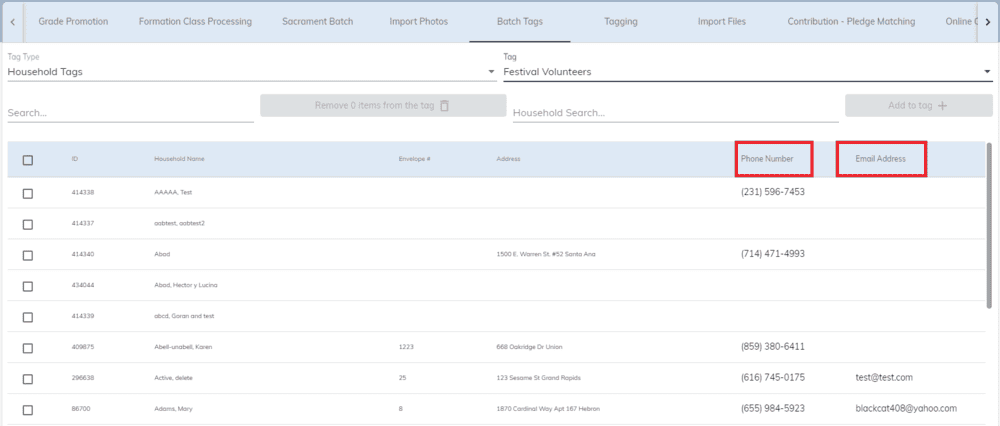
Contact Log.png64.49 KB Area Code Search Enabled We have added the capability to search by area code when using the household search bar. Four characters of the phone number are required for the area code search to be enabled.
Camino Updates - November 2024 through February 2025
We have been hard at work updating our system with new integrations and features that will help you in your business operations and evangelization efforts. Below you will find all new updates in the Camino system from November 2024 through February 2025.
Virtus Integration For those who use Virtus at your parish or diocese for tracking safe environment information, we have now enabled an API with the Virtus program. This allows you to see all parishioners who are in the safe environment program, their compliance status, their documents and trainings dates, and more. You no longer need to keep track of these important dates in two separate systems or spend long periods of time updating records. The Virtus API updates every night and in real time when you click on a specific member.
View a listing of all parishioners who are enrolled in Virtus
Introducing Document Batches/Individual Tax Letters on the Household Screen You now have the ability to run a report and create document batches, such as tax letters, and make these tax letters visible for individual households directly on their household screen. You no longer have to run a report with a specific ID number. These documents, which can include any document and not just tax letters, will now appear on the household level and are downloadable by word document or PDF.
Create documents for individual households
Save them on the household screen
Download documents to both word or pdf directly from the household screen
Diocese Fund Total Details If your diocese is using Camino for the Annual Appeal we can now show the specific donor detail of all contributions that were applied in credit to your parish. This has to be turned on at the Diocese level so please reach out to our customer service team to get this enabled.
View individual donor detail of those who have given to the annual appeal toward your parish goal
Filter by parishioner status
View members that may not even be in your parish database so you can call them and get them registered at your parish
Add Mass Counts to Camino You can now add Mass counts to Camino by creating your parish Mass times and giving a total count for any Mass or weekend. A report will be enabled so you can get this data out of the system and the diocese will have the ability to run the same report at their level for October Mass counts. You will need the proper access rights to view these new features.
Add Mass times under Administration and Parish Tab
Add Mass counts under parish life tab by clicking on Mass Counts
Screenshot 2025-03-07 at 12.41.19 PM.png100.95 KB OSV Integration We are happy to partner with OSV to offer a contribution API which will streamline your process for online giving at the parish. This API allows for you to pick a date range and click one button to import all your OSV contributions directly into Camino on a daily, weekly, or monthly basis. Forget manual entry or custom imports, we will handle the heavy lifting so you can focus on what matters the most.
]Bring all OSV contributions into Camino without export files
New Picture Directory Report We have enabled a report that automatically pulls the household picture you have stored in Camino. This gives you the ability to create a picture directory with basic contact information and print it off.Call our customer support to learn how to run this report at your parish.
Create a picture directory in word
Include basic contact information
Formatting of pictures has been enabled to make the report easy to print
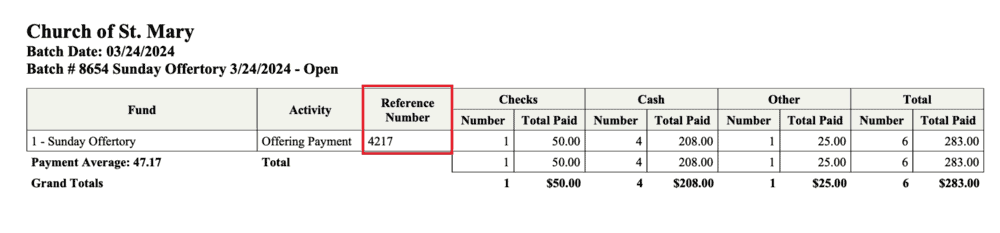
Improved Vanco Integration For those customers using Vanco for your online giving solution, we have updated the API to now match on not only envelope number but also on the last name to ensure data integrity. If there is a case where the envelope number was entered incorrectly we will notify you of the error by showing that the last name in Vanco and the last name in Camino does not match. This update is automatic but if you have any questions feel free to reach out to our support team.
Download Funds and Activities You can now download a list of all funds and activities at the parish or diocese level. This is helpful if you are trying to match funds between Camino and your online giving system or if you are ready to consolidate funds for accounting purposes.
Searching with accents In the main household search bar you can now search using accents and it will pull up the matching information in the system.
Additional Member Assignment Information Member assignment screens now include additional information on the member so you do not have to visit the member to learn more. Assignments.png63.75 KB
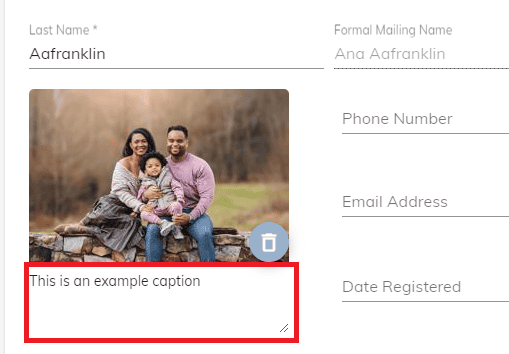
Added a field for captions for the family photo in the Household profile
Added more Fields to reports
Added Day, Month, and Year fields to some report types for each sacrament for better sorting in reports
Added the ability to split gifts in Batch Contributions
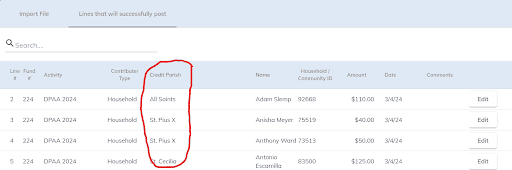
Now gifts can be split between different credit parishes when entering in batches whereas it was previously only available when importing online contributions
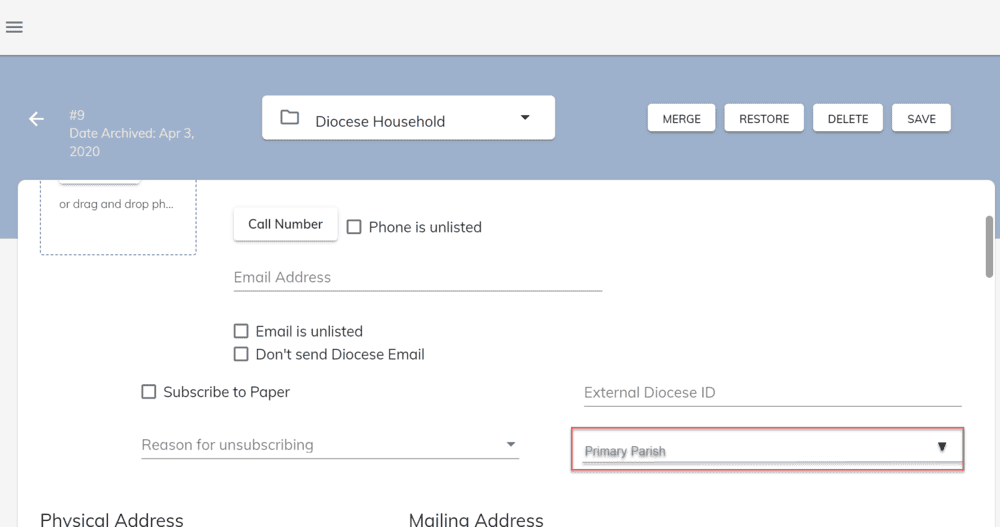
Added a Primary Parish Checkbox at the Diocese level
Added the ability to designate a household's primary parish when viewing from the diocese level for Bishop's Annual Appeal reporting.
Group Fund Goal tracking at the Diocese Level
Updated the Diocese Fund Goals page to allow for tracking group based fund goals.
Updated the pledge totals and contribution totals pages to show the combined totals for grouped parishes
Diocese fund totals dashboard properly shows the diagrams when parishes are grouped
Added Payroll ID Field
If the member is marked as a parish employee, we added an optional field to add a payroll ID
Added "diocese employee" at the diocese level for tracking this information
New search term for Member's screen
Added the ability to search by date of birth in the member's module
New term: "DOB=" or "dob="
New search term for Household's screen
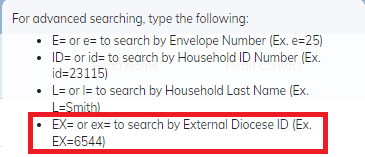
Added the ability to search by External Diocese ID in the member's module
New Term: "EX=" or "ex="
New Field on Member's Screen
Added a column for member's middle name to the Household Members page and Members page.
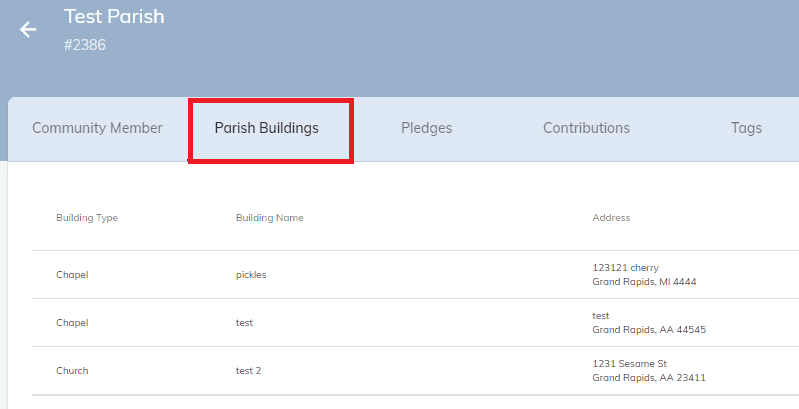
Added the "Parish Buildings" tab to the parish community member profiles at the diocese level. This feature is in the "Parish" section of Administration at the parish level
Tracking Internments for Cemeteries at the Diocese and Parish Level
New permission "Manage Cemetery"
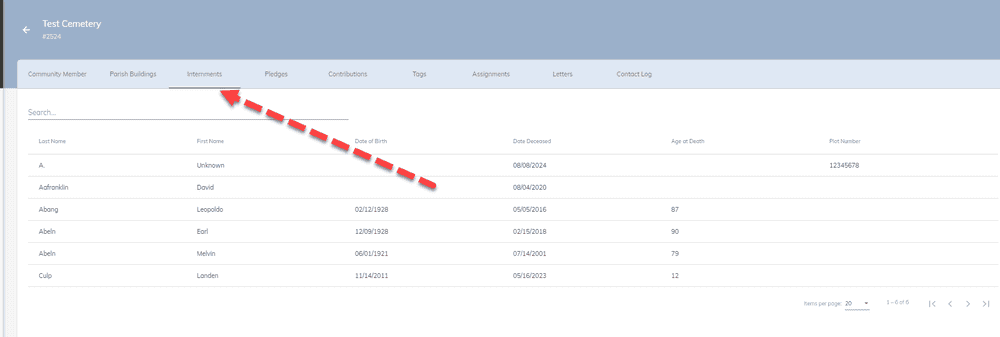
In the Diocese Community Member screen, with the new role, users can see and search a list of all people buried in the cemetery.
This feature does require the cemetery to be properly set up in the Diocese Community Members
The feature uses the new "Internments Tab"
Searches can be done by Name, Year of Deceased, or Plot Number
Graves will only show here if the cemetery was selected from the dropdown on the funeral tab.
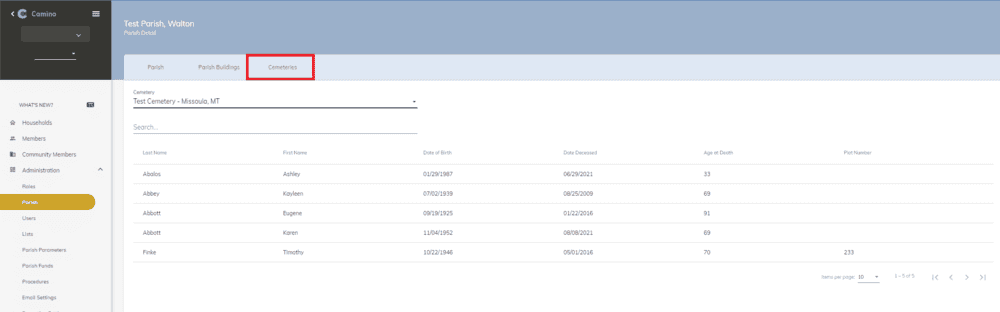
At the Parish level, if the cemetery is properly set up and the user has proper access, a new tab will be available in the Parish Admin screen.
Cemetery management for Parishes can be done from here.
If your diocese is not set up in Camino, contact support to have the cemetery(s) set up properly.
Tracking of Burial Plots
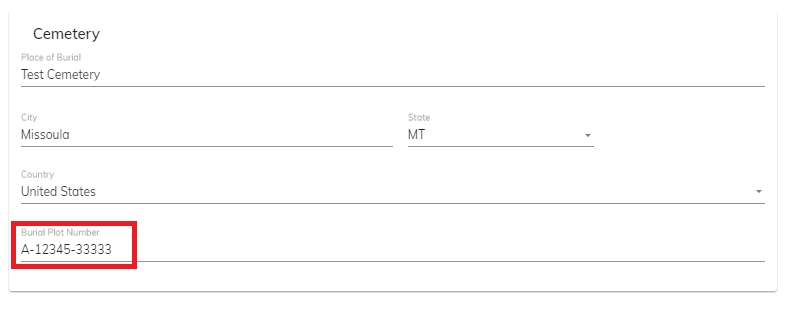
Added a field to allow for tracking of Burial Plots in the Funeral section of Sacraments
Support for Give Central Card Payments on Formation Registration
Credit Cards can now be accepted on the Formation Registration Public Page
Give Central is required
Accounts can be set up specifically for this purpose
Once set up payments can be marked required or optional per class
Fund and Activity are also set per class
Once payment is made, system will show "Paid" on the Online Registration Confirmation Screen and Roster/Reports
Similar feature for Diocese Catechesis coming soon
Other Changes and Updates
New Cemetery Category for Diocese Community Members and Ability To Link a Cemetery to a Parish
Diocese Common Cities can now be managed by Diocese in Lists
Added a "Legal Name" field for Parishes.
Parish Abbreviation used for Clustering and Diocese level Parish Searches
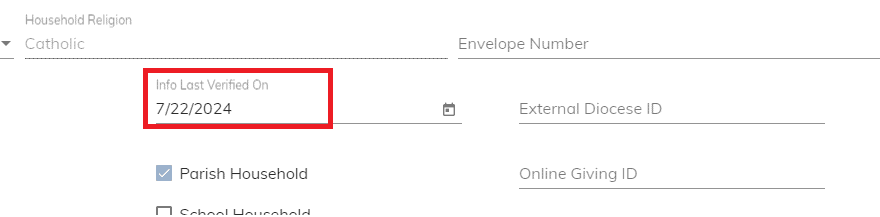
Added "Info Last Verified" to the Households screen so you can now indicate the last time the household contact and member information had been reviewed and verified
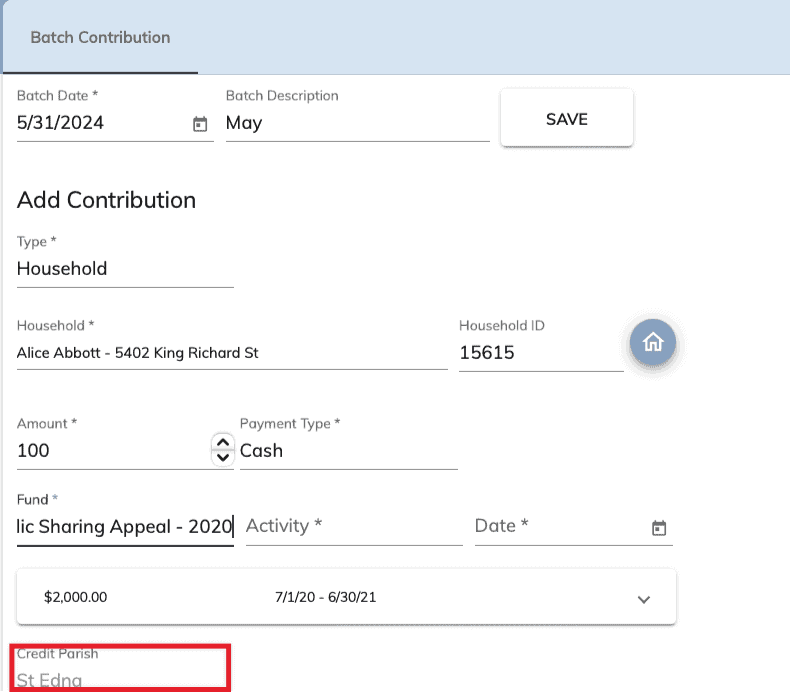
If you make a contribution to a pledge, it will force for the credit parish on both the pledge and contribution to be the same.
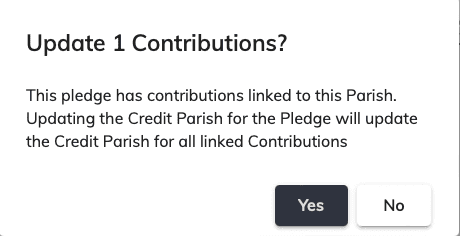
Warning on Credit Parish Change
If the Credit Parish is changed and it has contributions attached to it, it will bring up a warning letting you know that the credit parish will be changed on the contributions.
Pledge Deletion
Pledges can now be deleted from Camino with the correct access.
A Pledge cannot be deleted if it has contributions tied to it.
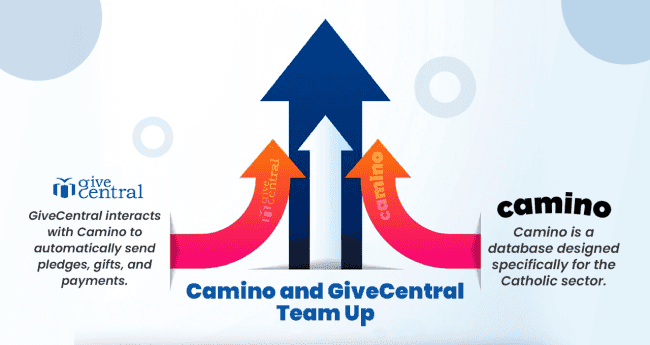
We want to introduce you to a preferred partner - GiveCentral. We have been working with GiveCentral in the Dioceses of San Diego and Helena, Montana for several months. Our expertise is in helping enrich your database and ministry tools. GiveCentral's focus is on helping make your engagement and fundraising as simple and easy as possible. This Partnership is just one of the ways that camino and GiveCentral are working together to support the nonprofit sector and help organizations focus on mission rather than administration.
GiveCentral interacts with Camino to automatically send pledges, gifts, and payments to the database without manual intervention. This integration allows nonprofits to seamlessly sync their donor data and fundraising campaigns between GiveCentral and Camino, eliminating the need for manual data entry and reducing the risk of errors, saving nonprofits valuable time and resources.
Please join us for this special one hour webinar:
What's new with Camino?
Opportunities and enhancements with Camino including lessons learned and best practices.
Who is GiveCentral? What does it mean to seamlessly sysnc between tools?
GiveCentral Opportunities & Demo
Join our upcoming webinars, click on the dates below
Introducing our new partnership with GiveCentral! GiveCentral is now a preferred partner of Camino. Together GiveCentral and the team here at Diocesan have laid the foundation of a seamless online giving experience. With this new integration, if you are a customer of GiveCentral, your online contributions will post to your Camino database automatically with almost zero effort on your end. This is just the beginning so stay tuned for many more features to come that will optimize and revolutionize your experience with the Camino database, such as automatic pledge ID matching, as well as features relating to faith formation. If you would like to learn more about GiveCentral and how it works with Camino, reach out to your Camino support specialist at 1-800-994-9817
Diocese Level - External Parish ID
External Parish ID added to Diocese Level Contribution Reports
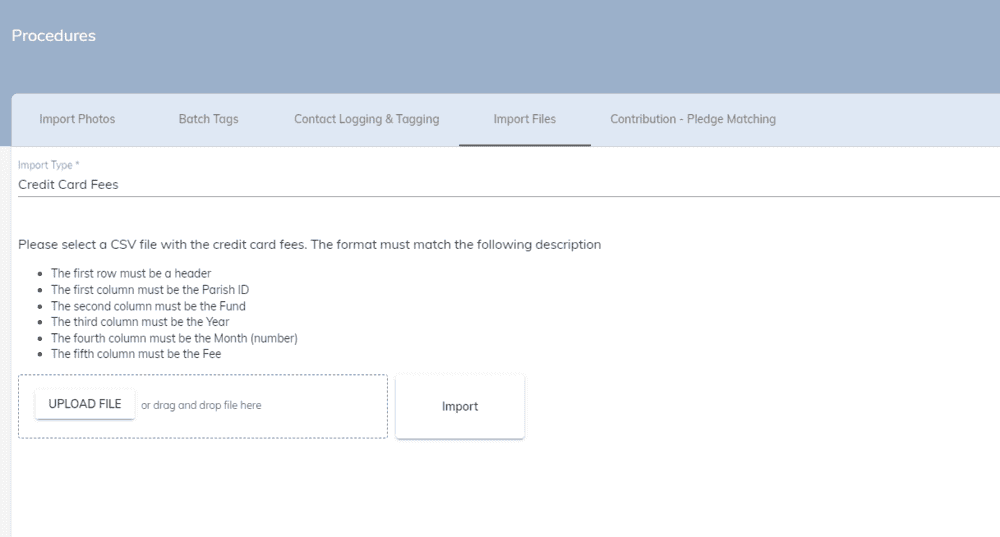
Diocese Level - Import Credit Card Fees
The ability to import Credit Card Fees from Give Central at the Diocese Level.
Diocese Level - Give Central Import supports Credit Parish
Give Central File Import API supports Credit Parish at Diocese Level.
New Assignment Address Field
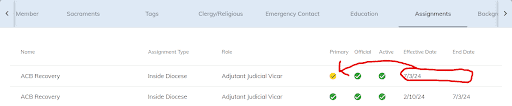
A future Primary Assignment can be made. It will show with a yellow circle and a checkmark. The current Primary Assignment will continue to show as well.
Current Assignment Address Options will be available if ALL of the following conditions are met: Official Assignment is checked Primary Assignment is checkedAssignment Type is “Inside Diocese” Address Type is “Member” Effective Date is in the future
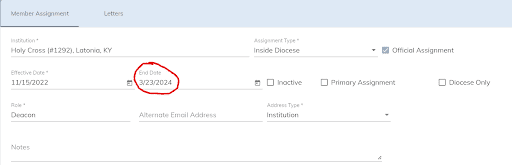
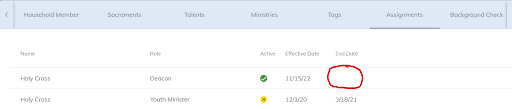
If the assignment’s End Date (made at the Diocese level) is in the future, it will not show at the Parish level until the End Date has passed.Diocese-level View:
Parish-level View:
The assignment’s End Date made at the Diocese level is in the future, and will not show at the Parish level until the End Date has passed.
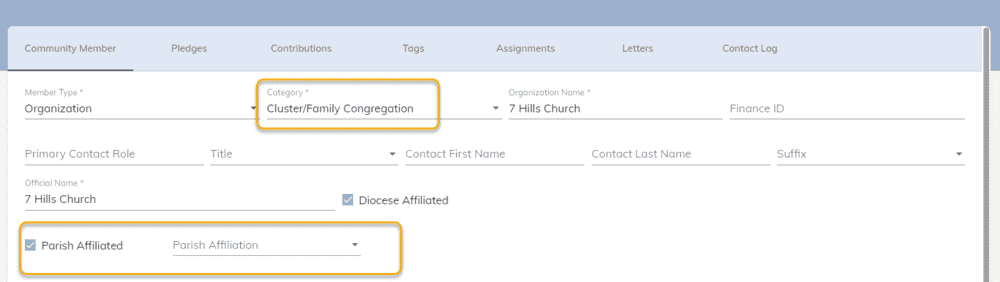
New Diocese Organization Category to support Congregations of Clusters
A new Diocese Organization Category called Cluster/Family Congregation which will represent churches where Mass is held in a parish community. It is not a separate parish, but a congregation in a parish community.
This congregation should be able to be linked to the parish. These are similar to the buildings parishes may setup, but accessible to the diocese so that they can track addresses, contact information, and any specific assignments.